

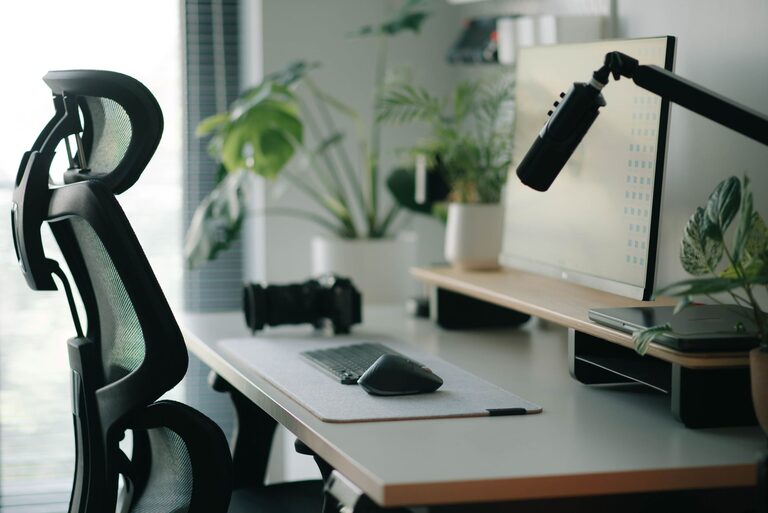
Creating an ideal desk setup is essential for maintaining focus and comfort throughout your workday. Whether you’re working from home or in an office, your workspace influences your productivity, mood, and overall well-being. In this post, we’ll explore practical tips to help you design a desk setup that keeps you comfortable and helps you stay focused.
Why Your Desk Setup Matters
A well-organized and ergonomic desk setup supports better posture, reduces fatigue, and minimizes distractions. When your workspace suits your needs, it becomes easier to concentrate and complete tasks efficiently. Let’s dive into the key elements of a desk setup that promotes focus and comfort.
Choose the Right Desk and Chair
Desk Height and Size
– Ergonomic height: Your desk should allow you to keep your elbows at about a 90-degree angle when typing or writing. Standard desk heights range between 28-30 inches, but adjustable desks are a great option to customize your workspace.
– Surface space: Make sure you have enough room for your computer, notebook, and any other essentials without feeling cramped.
Comfortable Chair
– Adjustability: Choose a chair with adjustable height and lumbar support. This helps maintain good posture and reduces strain on your back.
– Cushioning: A comfortable seat cushion can improve comfort for long hours.
– Mobility: Rolling chairs allow you to move easily without straining.
Optimize Monitor Placement
The position of your monitor is crucial for reducing eye strain and neck pain.
– Eye level: The top of your monitor screen should be at or just below eye level. This encourages a natural head position.
– Distance: Place the monitor about an arm’s length away. This distance reduces eye strain while allowing you to see clearly.
– Dual monitors: If you use more than one screen, arrange them side by side, with the primary monitor directly in front of you.
Improve Lighting
Good lighting enhances focus and reduces eye fatigue.
– Natural light: Position your desk near a window if possible. Natural light boosts mood and productivity.
– Task lighting: Use a desk lamp with adjustable brightness and direction to illuminate your work area without causing glare.
– Avoid screen glare: Position screens to minimize reflections from windows or overhead lights.
Organize Your Desk Essentials
A clutter-free desk helps maintain focus and reduces stress.
– Minimal items: Keep only what you need daily on your desk to avoid distractions.
– Storage solutions: Use drawers, shelves, or desk organizers to store papers, stationery, and cables.
– Cable management: Use clips or cable sleeves to keep wires tidy and prevent tangling.
Prioritize Ergonomics
Ergonomics ensures your body stays comfortable and healthy during work.
– Keyboard and mouse placement: Keep your keyboard and mouse close to each other and at a height that allows your wrists to stay straight.
– Use a wrist rest: They provide support and reduce strain when typing for long periods.
– Foot support: If your feet don’t rest flat on the ground, use a footrest to improve posture.
Personalize with Comfort in Mind
Adding personal touches can make your workspace more inviting without distracting you.
– Plants: Small desk plants can improve air quality and create a calming environment.
– Photos or art: Choose items that inspire or soothe you.
– Comfort accessories: A soft throw blanket or a cushion can add warmth on cooler days.
Incorporate Movement and Breaks
No desk setup can replace the benefits of regular movement.
– Standing desks: Consider a sit-stand desk to alternate between sitting and standing.
– Stretch breaks: Set reminders to stand, stretch, and move every 30 to 60 minutes.
– Walks: Taking short walks helps refresh your mind and reduce muscle stiffness.
Keep Technology Handy and Efficient
Technology should support your workflow, not hinder it.
– Wireless devices: Wireless keyboards and mice reduce clutter and increase flexibility.
– Charging stations: Use charging docks or stations to keep devices powered without messy cables.
– Noise-canceling headphones: These can help block distractions in noisy environments.
Regularly Review and Adjust Your Setup
As your work needs change, so should your desk setup.
– Evaluate your comfort and productivity periodically.
– Make small adjustments to improve ergonomics or organization.
– Stay open to trying new tools or furniture that can enhance your workspace.
—
By thoughtfully arranging your desk and surrounding area, you create an environment that encourages focus and supports your comfort throughout the day. Start with a clean, ergonomic foundation, then personalize your setup to suit your needs. With these desk setup tips, you’ll be well on your way to a more productive and enjoyable work experience.